If you discover a Win 10060 error while entering your license key, this article will help you.
The 10060 error is basically saying: the app tried to contact the license server, but the connection timed out it is not possible to activate the license.
Common causes
- unstable internet connection (Wi-Fi dropouts, packet loss).
- Firewall / AV / endpoint protection blocking the app (Windows Defender Firewall, corporate security tools).
- Proxy / Corporate proxy required (network only allows web via proxy; the app isn’t using it).
- VPN / DNS filtering / adblock DNS interfering with the licensing domain.
Quick ways to confirm what it is
- Try activating on a different network (mobile hotspot). If it works → your original network/security/proxy is the issue.
- Open the license URL in a browser https://online.redcatch.at If the browser can’t reach it either, it’s network/DNS/firewall or server outage.
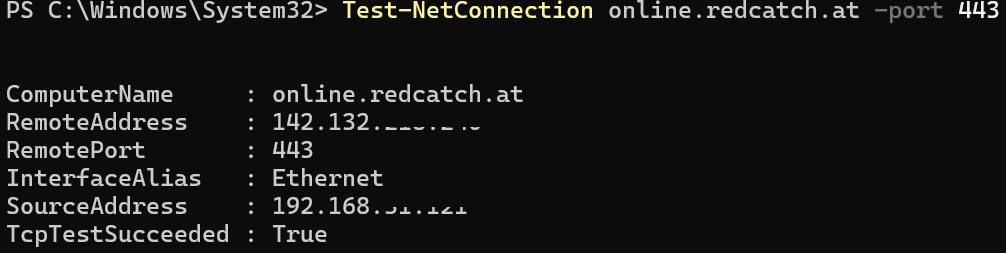
- From the same PC/network, test reachability to the license host
- Temporarily disable VPN, and ensure the app is allowed through Windows Defender Firewall (or whitelist the license domain in your security software).
Was this article helpful?
That’s Great!
Thank you for your feedback
Sorry! We couldn't be helpful
Thank you for your feedback
Feedback sent
We appreciate your effort and will try to fix the article