Why do drone PPK processing results sometimes drop to a FLOAT solution?
In most PPK projects, the goal is to achieve a stable FIX solution. However, in some flight segments, the result may drop to a FLOAT solution.
The good news: PPK stability can often be improved with the right processing settings and flight style.
The honest truth: some limitations are caused by the drone hardware, firmware, GNSS logging rate, antenna design, or flight dynamics.
Below are the most common reasons we have identified, together with practical recommendations.
TABLE OF CONTENTS
- 1. General topic: Flight speed and GNSS logging rate
- 2. Aggressive pitch, tilt, braking, and height changes
- 3. DJI rover file format: use .BIN or .RTK when possible
- 4. Insufficient or wrong NAV files
1. General topic: Flight speed and GNSS logging rate
Cause
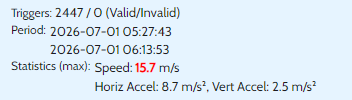
High flight speed can reduce PPK stability, especially when combined with terrain-following flights or strong height changes.
For example, some drones log GNSS rover data at only 5 Hz. This means the drone records five GNSS epochs per second. Other drones, such as the Mavic 3 Enterprise, may provide 10 Hz rover logging.
With fewer GNSS epochs available, the PPK filter has less temporal resolution. This makes it less tolerant to high dynamics, especially when the drone is flying fast, turning, braking, or following terrain.
Typical result
When flying faster than approximately 10 m/s, the ambiguity confidence or ratio can drop more easily. As a result, a FIX solution may fall back to FLOAT and may stay FLOAT for a longer period in these flight segments.
Recommendation
Fly slower, especially in terrain-following mode or in areas with strong height changes.
As a practical rule, we recommend keeping the speed at or below 10 m/s when stable PPK results are critical.
2. Aggressive pitch, tilt, braking, and height changes
Cause
Modern drones can perform quite aggressive flight movements during mapping missions, especially during turns, braking, descents, or terrain-following flights.
During these movements, the drone may pitch or tilt more strongly. Depending on the antenna design and satellite geometry, this can temporarily reduce satellite visibility or signal quality. Low-elevation satellites are especially sensitive to this.
This can lead to noisy carrier-phase measurements or even cycle slips, meaning the receiver temporarily loses carrier-phase lock.
Typical result
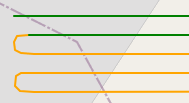
FLOAT clusters often appear directly around:
descents
braking events
sharp turns
terrain-following segments
areas with poor or partly obstructed sky view
These segments are often visible in the trajectory as short areas where the solution changes from FIX to FLOAT.
Recommendation
If low-elevation satellites are noisy or frequently interrupted during drone tilt, increase the open-sky elevation mask in REDtoolbox.
Go to:
REDtoolbox > Settings > Advanced Settings
The default value is usually:
ppk_opensky_elmask = 25
Try increasing it to:
30
or, in more difficult cases:
35
This removes low satellites from processing and uses only satellites with more reliable signal quality. In many cases, this can improve FIX stability because satellites with frequent interruptions and cycle slips are excluded.
!! But be aware, as this decreases the number of available satellites too and you may run into other problems.......
3. DJI rover file format: use .BIN or .RTK when possible
Cause
With some DJI drones and firmware versions, the drone-generated .OBS file may not contain the full dual-frequency observation data correctly.
We have seen cases where the .OBS file contained only L1 data for GPS and GLONASS, while BeiDou observations looked correct. In such cases, L2 data may be missing for some constellations.
Typical result
If important dual-frequency carrier-phase data is missing, ambiguity fixing becomes significantly harder. This can lead to more FLOAT results during PPK processing.
Recommendation
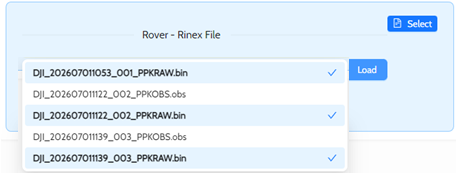
For DJI drones, use the raw rover file whenever possible.
Depending on the drone model, this may be:
.RTK
or
.BIN
Use this file as the rover input in REDtoolbox. REDtoolbox will convert the raw rover file correctly and use the available GNSS observations for PPK processing.
This is often more reliable than using the drone-generated .OBS file directly.
4. Insufficient or wrong NAV files
 Cause
Cause
Very often, FLOAT results are caused by insufficient, incomplete, or unsuitable navigation files from the base station.
For good PPK processing, the NAV files must contain the required satellite orbit and clock information for the same time period as the flight and base station observation data.
Please avoid using NAV files from the drone as the main navigation source. Drone-generated NAV files may be incomplete or not suitable for reliable PPK processing.
Typical result
If the NAV data is incomplete or unsuitable, the PPK engine may not be able to use all available satellites correctly. This can reduce ambiguity fixing performance and lead to more FLOAT solutions.
In some cases, the rover and base observation files look fine, but the processing result is still unstable because the NAV file does not provide sufficient satellite information.
Recommendation
Use the NAV file from the base station whenever possible.
Make sure that:
the NAV file covers the full time period of the flight
the NAV file matches the GNSS constellations used during processing
the base observation file and NAV file belong together
drone NAV files are not used as the primary NAV source
If the base station NAV file is missing, incomplete, or suspicious, download a suitable broadcast NAV file or use the NAV download option in REDtoolbox.
In REDtoolbox, we recommend using the NAV downloader if the available base station NAV file does not provide reliable processing results.
Was this article helpful?
That’s Great!
Thank you for your feedback
Sorry! We couldn't be helpful
Thank you for your feedback
Feedback sent
We appreciate your effort and will try to fix the article